


Search Here

Table of Contents
|
A chair for lumbar support quietly accompanies users through video calls that run long, reports that demand concentration, and those stretches when deadlines pile up. It holds users steady while leaning forward to type and settles while pausing to think.
Yet many chairs fall short of this supportive role. Understanding what makes seating truly helpful for the lower back can change how users experience every workday. Below, we walk through the mechanics, the features, and the habits that turn ordinary sitting into something the body genuinely appreciates.
The modern workday often means sitting for 9-10 hours when workers combine office time with commutes. This extended sitting places continuous pressure on the spine, and without adequate support, discomfort becomes an unwelcome companion.
When users sit in a chair that lacks lumbar support, the lower spine tends to flatten or curve outward. This slouched position strains the muscles, ligaments, and discs in the back. Research indicates that sitting increases spinal pressure compared to standing or lying down, and prolonged sitting without support impairs oxygenation to spinal tissues.
The consequences go beyond temporary stiffness. Over time, poor sitting posture can contribute to disc degeneration and chronic lower back pain and even affect respiratory function. The spine's natural S-shaped curve exists for good reason—it distributes the body weight efficiently and keeps people balanced. A chair for lumbar support helps preserve this curve, preventing the cascade of problems that begin with a simple slouch.
Back pain rarely announces itself dramatically. Instead, it creeps in—a slight ache after lunch, some stiffness by evening, and tightness in the shoulders after a long meeting. Many professionals in their late twenties now report wrist pain, lower back issues, and shoulder stiffness as routine complaints.
This gradual onset makes the problem easy to ignore until it affects sleep quality, concentration, and overall comfort. The combination of sedentary desk work and inadequate seating creates cumulative strain. The muscles weaken, flexibility decreases, and what started as minor discomfort becomes a persistent issue. An office chair with lumbar support intervenes early in this cycle, providing the backing the lower spine needs before problems compound.
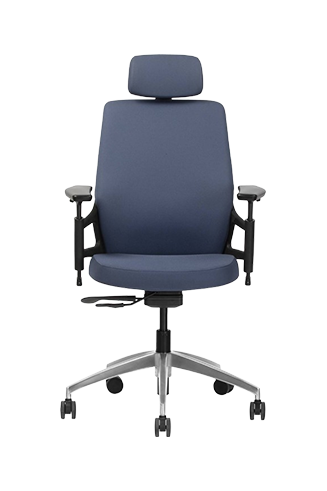
This is where ergonomic features can make a meaningful difference. For instance, the Wipro Adapt chair uses an automatic weight-sensing mechanism which provides adequate back support as per the weight of the user, while its Aeroflo seat distributes pressure more evenly and improves airflow for greater comfort during long workdays.
Understanding the mechanics behind lumbar support helps users appreciate why it matters and how to use it effectively. The principle is straightforward: provide targeted support where the spine naturally curves inward, and the rest of the posture tends to follow.
The spine maintains an S-shaped curve when people stand. Proper lumbar support helps maintain this same curvature when seated. When the support aligns correctly with the lower back, it prevents the spine from flattening or slumping, which would otherwise lead to slouched posture.
A well-designed lumbar system does more than fill the gap between the back and the chair. It actively supports the vertebra in the lower spine, reducing the muscular effort needed to hold yourself upright. This means less fatigue, less strain, and a more natural seated position that the body can sustain comfortably for hours.
|
Seating Element |
Basic Chair |
Chair with Lumbar Support |
How It Helps |
|---|---|---|---|
|
Lower Back Contact |
Minimal or flat |
Contoured, adjustable |
Maintains spinal curve |
|
Muscle Engagement |
High effort to sit straight |
Reduced effort |
Less fatigue over time |
|
Posture Tendency |
Encourages slouching |
Encourages alignment |
Better long-term habits |
|
Comfort Duration |
Decreases quickly |
Sustained through the day |
Improved focus |
No two spines are identical. Height, body shape, and individual spinal curvature all influence where lumbar support feels most effective. Fixed lumbar support may still outperform a flat backrest, but adjustable systems offer far greater flexibility.
The best chair for lumbar support allows users to move the support vertically, adjust its depth, or alter tension to match specific needs. This becomes particularly valuable in shared workspaces—co-working environments, hot-desking setups, or offices where colleagues occasionally swap seats. Adjustable lumbar systems ensure each user can achieve proper support regardless of their body type.
Chairs like the Wipro Absolute exemplify this brilliantly, thanks to their contoured backrest coupled with a wide and adjustable lumbar support. Additionally, it also features adjustment options for the seat depth and armrests.
With so many chairs claiming ergonomic benefits, distinguishing genuine support from marketing language requires knowing which features genuinely contribute to a user's comfort.
An ergonomic office chair with lumbar support typically includes several interconnected features:
Adjustable lumbar depth and height: Lets users position support precisely where the spine curves inward
Seat height adjustment: Ensures that the knees bend at 90 degrees with feet flat on the floor
Seat depth adjustment: Prevents pressure behind the knees while keeping the back against the lumbar support
Armrest adjustability: Reduces shoulder and neck strain by supporting the arms at a comfortable height
Tilt and recline options: Encourages slight recline to reduce spinal pressure and allows natural movement
|
Design Insight: Why Movement Matters The most supportive chairs encourage subtle shifting throughout the day. Rather than locking you into one "correct" position, they accommodate leaning back during calls, sitting upright for focused typing, and gentle movement that keeps the body engaged. This flexibility prevents the stiffness that comes from static sitting. |
A chair fits well when a user can sit with the back fully against the backrest while the feet rest flat on the floor. The lumbar support should meet the inward curve of the lower spine without pressing uncomfortably or leaving a gap.
Check these alignment points:
Knees: Bent at approximately 90 degrees
Hips: Level or slightly higher than knees
Lower back: Supported by the lumbar cushion or contour
Shoulders: Relaxed, not hunched forward
Screen height: Eyes level with the top third of your monitor
Frequent readjusting, sliding forward, or difficulty maintaining a comfortable posture may indicate that the chair is poorly adjusted or lacks adequate support. Adjusting its settings—or switching to an office chair with proper lumbar support that fits the user's body proportions—can help improve comfort and posture.
Physical discomfort affects more than the body; it can impair concentration, influence mood, and reduce productivity, particularly when pain or musculoskeletal strain becomes persistent. Understanding this connection helps explain why thoughtful seating choices matter beyond mere comfort.
When users are comfortable, they stop fidgeting. The brain stops shifting. The body can focus better because the body isn't constantly sending distress signals that demand attention. This simple observation carries significant implications for knowledge work, where sustained concentration determines quality.
Research consistently links good workplace ergonomics with reduced injuries and lost work time. But the benefits extend to daily experiences too. Meetings feel less draining when the back isn't aching. Deadlines feel more manageable when the body is not fighting discomfort alongside the workload. The best chair for lumbar support becomes a quiet ally in productivity, working behind the scenes to keep users comfortable enough to do the best thinking.
For organisations, the investment translates to tangible value. Ergonomic furniture has a measurable impact on staff wellness, particularly for roles involving long computer-based work. Investing in proper seating isn't merely about amenities—it's about creating conditions where people can consistently perform well.
Quality matters when selecting a chair for lumbar support. Industry standards like ANSI/BIFMA X5.1 test chairs for safety and durability, simulating over ten years of daily use. Looking for compliance with such standards helps distinguish reliable seating from chairs that may look similar but lack lasting structural integrity.
Beyond certifications, consider how the chair accommodates specific work patterns. If you alternate between typing, reading, and video calls, users need a chair that supports different postures throughout the day. If the workspace experiences warm weather, breathable materials prevent discomfort from heat buildup.
Choosing a chair for lumbar support is ultimately about caring for the body through the hours users spend working. The right chair maintains the spine's natural alignment, reduces the gradual accumulation of strain, and helps users stay focused when work demands uninterrupted attention.
Small adjustments in seating can lead to meaningful improvements in how users feel at the end of each day. Explore Wipro's ergonomic seating solutions to find chairs designed with comfort, health, and long workdays in mind.
1. How does a chair for lumbar support reduce back pain?
A chair for lumbar support maintains the spine's natural curve, preventing the slouching that strains muscles and discs. This reduces pressure on lower back tissues, minimising pain that builds up during extended sitting.
2. What features should I look for in an office chair with lumbar support?
Prioritise adjustable lumbar height and depth, seat height control, armrest adjustability, and tilt mechanisms. These features allow customisation for your body and encourage healthy posture throughout your workday.
3. How often should I adjust my ergonomic office chair with lumbar support?
Check your chair settings whenever you notice discomfort or after others use the same workspace. Regular adjustments ensure the lumbar support continues meeting the spine's curve as the posture naturally shifts.
4. Can a chair for lumbar support help with neck and shoulder pain?
Yes. Proper lower back support encourages overall spinal alignment, which reduces compensatory strain on the neck and shoulders. The best chair for lumbar support addresses interconnected postural issues.
5. Is an office chair with lumbar support worth the investment?
Considering that poor seating contributes to chronic discomfort, reduced productivity, and potential medical expenses, quality ergonomic seating offers meaningful value. It supports your daily wellbeing and work performance.