


Search Here
Table of Contents
|
The office chair carries a worker's focus through back-to-back meetings, deadline sprints, and those afternoon hours when energy dips. It quietly supports users while leaning forward to concentrate and while shifting positions seeking comfort. Learning how to choose an office chair begins with recognising this relationship.
The reality is that not every chair serves the body equally. Thoughtful seating design works in the background, supporting the posture without demanding attention. Below, we walk through the features, standards, and considerations that help users find seating genuinely built for a workday.
Before examining what to look for, it helps to understand what happens when seating falls short. The average desk-bound professional sits for nine to eleven hours daily, often longer than they sleep. This prolonged sitting, especially in poorly designed chairs, creates compounding strain that shows up as neck stiffness, lower back aches, and fatigue that follows users home.
Physical discomfort doesn't stay physical. When the body manages persistent strain, the brain allocates attention to those pain signals rather than actual work. Research confirms that workplace discomfort directly correlates with lower productivity, as focus fractures under the weight of physical distraction. Understanding how to pick a good office chair becomes an investment in both comfort and performance.
The term "ergonomic" appears on countless product labels, yet its meaning often gets lost in marketing. Genuine ergonomic design centres on one principle: supporting the body's natural alignment while allowing movement. This differs fundamentally from chairs that simply look comfortable or carry premium price tags.
The core concept comes from achieving what occupational health experts call a "neutral body posture", where the joints rest in naturally aligned positions without strain. To understand how to choose ergonomic chair features, users are looking for seating that facilitates this neutral positioning while adapting to unique body dimensions.
This is where thoughtfully engineered features make a meaningful difference. For example, the Wipro Adapt is designed to support a wide range of users through its automatic weight-sensing mechanism, allowing the chair to adjust effortlessly to different body weights without manual intervention. Complementing this is the Aeroflo seat design, which promotes even weight distribution while its porous construction enhances airflow to help manage heat buildup during prolonged sitting.
Together, these features reflect the principles of genuine ergonomic design—supporting natural alignment, encouraging movement, and delivering consistent comfort throughout the workday.
Modern ergonomic thinking has shifted away from enforcing one "correct" sitting posture. The body isn't designed to remain fixed for hours, even in a technically proper position. The healthiest approach involves micro-movements throughout the day: leaning back during calls, sitting upright for focused tasks, and shifting when the body signals the need.
A well-designed chair encourages this natural variability rather than restricting it. Features like tilt mechanisms and flexible backrests support the spine through position changes, preventing the fatigue that comes from static sitting. This understanding reshapes how to choose the right office chair: users are seeking a chair that moves with the body, not one that locks it in a place.
With foundational principles clear, the practical selection process begins. Certain features consistently separate supportive seating from chairs that compromise user comfort. Understanding these elements helps evaluate any chair with confidence, regardless of brand or price point.
The following features form the foundation of how to pick the best office chair for sustained daily use. Each addresses specific aspects of how the body interacts with seating during long work hours.
Seat height adjustment ranks among the most fundamental ergonomic features. When the seat sits too high, the feet lose contact with the floor, disrupting circulation and forcing the back to compensate. OSHA guidelines recommend positioning that allows feet to rest flat while thighs remain parallel to the ground.
Most quality chairs offer pneumatic height adjustment. The range accommodates most body types, allowing users to achieve that 90-degree knee angle that supports healthy circulation. When learning how to choose an office chair, always test this adjustment range against the desk height and body proportions.
The lower spine naturally curves inward, and maintaining this curve during seated work prevents strain on discs and ligaments. Without proper support, you unconsciously slouch, increasing posterior disc loading and creating the conditions for chronic lower back discomfort.
Quality lumbar support comes in several forms. Fixed lumbar contours work well for standard body types, while adjustable systems allow users to position support precisely where the lower back needs it. Height-adjustable lumbar features matter, particularly for shared seating or individuals with specific back support requirements. This consideration proves central to how to pick a good office chair that serves users through years of daily use.
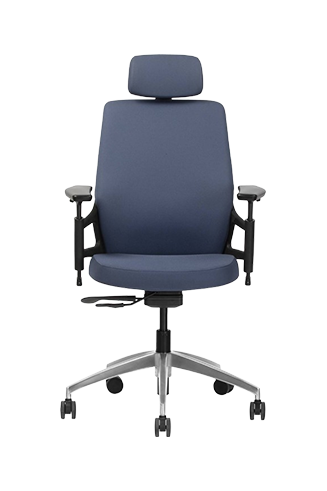
A good example of this approach is the Wipro I'm Pro chair. Along with a contoured backrest that supports the natural curve of the lower spine, it offers adjustments for seat height, lumbar support, and armrests, allowing users to personalise the fit to their body and working style. By combining targeted lumbar support with multiple ergonomic adjustments, the chair is designed to deliver consistent comfort and support throughout the workday, regardless of the task at hand.
|
Comfort Insight: The lumbar region comprises five vertebrae that bear significant load during sitting. Proper support here reduces stress not just locally but throughout the entire spine, affecting everything from shoulder tension to neck comfort. |
Armrests often receive less attention than they deserve. When properly positioned, they relieve shoulder strain by supporting the forearms during keyboard work. Poorly positioned armrests, however, can push shoulders upward or force awkward elbow angles.
The gold standard involves 4D armrests: adjustable in height, width, depth, and angle. This flexibility ensures the armrests adapt to the body rather than demanding that users adapt to them. For those spending significant hours typing, this feature significantly influences how to choose the right office chair for sustained comfort.
Certifications provide objective assurance about chair quality, moving beyond marketing claims to verified standards. Two certifications consistently indicate thoughtful design and reliable construction.
BIFMA certification (Business and Institutional Furniture Manufacturers Association) represents the global standard for furniture safety and durability. Chairs bearing this certification have undergone rigorous testing, including drop tests, pull tests, and cycle tests simulating years of heavy use. While BIFMA primarily addresses structural integrity rather than ergonomic outcomes, it ensures the chair won't fail under normal use conditions.
EN 1335 focuses specifically on ergonomic dimensions and adjustability, ensuring chairs accommodate diverse body types. This European standard complements BIFMA by addressing how well seating supports natural posture across different users. Together, these certifications offer a more complete picture of chair quality than either provides alone.
Different work patterns demand different seating features. Someone spending eight hours at a single workstation has different needs than a professional splitting time between desk work, meetings, and collaborative spaces. Understanding how to choose ergonomic chair options means matching features to actual work rhythms.
For intensive desk work: Prioritise robust lumbar support, deep adjustability, and breathable materials that manage heat during long sessions. Mesh backs offer significant advantages in warm environments, allowing airflow that fabric seats cannot match.
For hybrid workspaces: Consider chairs that adjust quickly between users or positions. Easy-reach controls and intuitive adjustment mechanisms matter when you're switching setups throughout the day.
For home offices: Space efficiency becomes relevant alongside ergonomic features. Chairs with slimmer profiles that still deliver proper support work well in bedroom-office setups or compact living spaces.
Before making any purchase, run through this practical checklist to ensure you're covering the essentials:
Adjustability Essentials:
Pneumatic seat height adjustment with appropriate range for your desk
Seat depth adjustment or adequate depth for your thigh length
Lumbar support that reaches your lower back's natural curve
Armrests adjustable in at least height and width
Comfort Indicators:
Breathable materials suited to your office climate
Adequate seat cushioning that doesn't compress flat quickly
Backrest that supports natural spinal curves
Smooth tilt mechanism for position changes
Quality Markers:
BIFMA or equivalent durability certification
Warranty period reflecting manufacturer confidence
Stable five-point base with appropriate casters for your flooring
Practical Considerations:
Weight capacity matching your needs
Assembly requirements and available support
Return policy allowing adequate trial period
This checklist supports how to pick the best office chair by ensuring no critical element This checklist ensures that you don't overlook any critical elements when evaluating how to choose the best office chair during evaluation.
Understanding how to choose an office chair ultimately means recognising seating as a daily companion rather than a mere purchase. The right chair supports the posture through morning focus, adapts when afternoon fatigue sets in, and prevents the accumulating strain that diminishes both comfort and performance.
Employees using ergonomic seating demonstrate higher productivity, alongside reduced discomfort and better sustained energy. Considering how many hours a chair carries users through, investing in thoughtful design delivers returns that extend far beyond the initial cost. Explore Wipro's ergonomic seating solutions to find chairs built with comfort, health, and workday in mind.
1. How do ergonomic chairs reduce back pain during long work hours?
Ergonomic chairs maintain the spine's natural curves through proper lumbar support and adjustable features. This alignment reduces disc pressure and muscle strain that accumulates during prolonged sitting, addressing the root causes of seated back discomfort.
2. How to choose an office chair for someone with existing back problems?
Prioritise adjustable lumbar support, seat depth adjustment, and recline mechanisms. The chair should adapt to specific spinal needs rather than forcing the back into predetermined positions. Consider professional ergonomic assessment for chronic conditions.
3. How to pick a good office chair for warm climates?
Mesh backs provide superior airflow compared to padded alternatives, preventing heat buildup during long hours. Breathable seat materials and moisture-wicking fabrics also help maintain comfort in humid conditions.
4. How to choose the right office chair for shared workspaces?
Select chairs with intuitive, easily accessible adjustment controls that allow for quick personalisation between users. Pneumatic height adjustment, tension-adjustable recline, and simple armrest controls accommodate diverse body types without lengthy setup times.
5. Are expensive office chairs always worth the investment?
Price doesn't automatically guarantee comfort or durability. Focus on specific features, certifications, and warranty coverage rather than cost alone. A moderately priced chair with proper adjustability often outperforms expensive options lacking essential ergonomic features.