


Search Here
Table of Contents
|
That midday slump hits differently when the lower back already aches from morning meetings. Workers shift positions, stretch briefly, then settle back into the same uncomfortable posture that's been a companion since the commute ended.
This daily dance with discomfort affects millions of professionals across modern workspaces. The solution often sits right beneath them—waiting to be understood, adjusted, and optimised for the body's unique needs.
The relationship between a user's chair and well-being runs deeper than momentary discomfort. What starts as occasional stiffness can evolve into patterns that affect one's entire work experience and quality of life.
Studies reveal that approximately 76% of workers report work-related musculoskeletal disorders, with the lower back bearing much of this burden. This widespread issue stems from how static positions create sustained muscle tension, reducing blood flow and compressing spinal discs over time. The economic impact proves equally staggering—MSDs account for one-third of all workplace injuries.
The body communicates through these aches, signalling when support systems fail to meet its needs. Each hour spent in inadequate seating compounds these effects, creating micro-injuries that accumulate into chronic conditions. The IT sector particularly feels this impact, with 51% of professionals reporting persistent low back pain.
Beyond physical discomfort, inadequate seating for back pain creates ripples throughout one's professional life. Concentration wavers when workers are constantly adjusting positions, seeking relief from pressure points. Decision-making suffers when fatigue sets in earlier than it should.
Research demonstrates that comfortable workers make fewer mistakes and maintain better focus throughout the day. The connection proves simple—when the body feels supported, the mind can fully engage with the tasks at hand. Conversely, persistent discomfort acts like background noise, constantly pulling attention away from work.
Modern work patterns have fundamentally shifted how employees interact with the workspace. Understanding these changes helps explain why seating deserves serious consideration in the wellness strategy.
Today's professionals spend an average of 11.3 hours sitting each day. Factor in commute times through city traffic, and this number climbs even higher. The chair becomes the most constant workplace companion—present through video calls, deadline crunches, and those long afternoon report reviews.
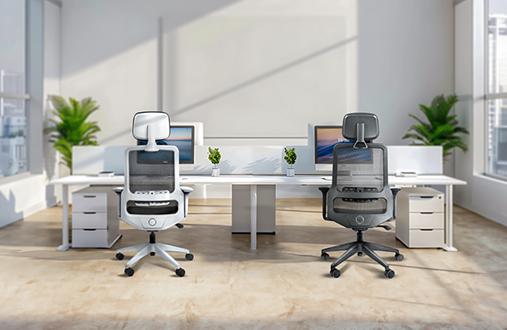
The shift to hybrid work adds another layer of complexity. Home office setups often lack the ergonomic considerations of corporate spaces, with dining chairs pressed into service for eight-hour workdays. This makeshift approach amplifies the importance of understanding what truly supportive seating provides, whether workers are working from an apartment in Bengaluru or a co-working space in Pune.
Static positions, regardless of how "correct" they seem, create their own challenges. The body thrives on movement, with muscles designed to contract and release rather than hold fixed positions indefinitely. The best ergonomic chair for back pain recognises this need, encouraging natural shifting and repositioning throughout your day.
|
Design Insight: Dynamic Sitting Modern ergonomic thinking has moved beyond finding one "perfect" position. Instead, it focuses on enabling micro-movements—subtle weight shifts, gentle stretches, and posture variations that keep the body engaged and blood flowing freely. |
The mechanics of how employees sit reveal why certain designs succeed while others fail. This knowledge empowers organisations to make informed choices about the workspace setup.
The spine naturally curves in an S-shape, with the lower back curving inward (lordosis), the upper back curving outward (kyphosis), and the neck curving inward again. Good seating respects these curves rather than forcing them into unnatural positions. When alignment falters, muscles work overtime to compensate, leading to fatigue and pain.
Proper support ensures that the spine maintains its natural curves without excessive effort. This means a chair should work with the body's design, not against it. The lumbar region particularly needs this support, as it bears significant weight and tends to flatten when workers sit without adequate backing.
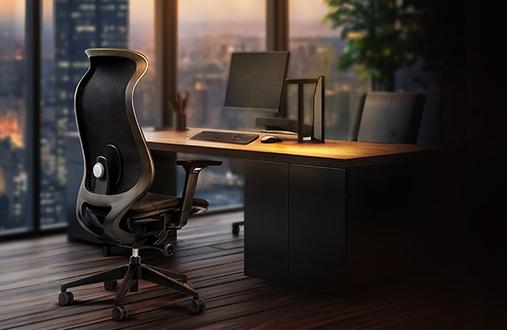
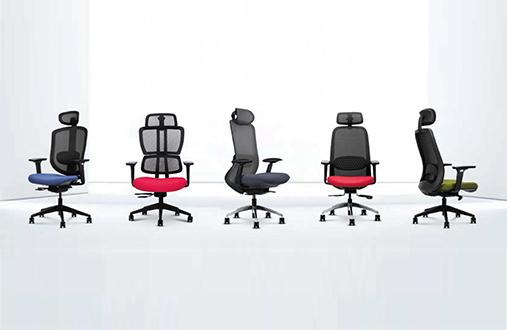
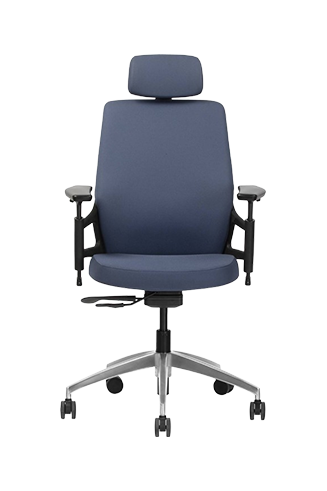
Chairs that incorporate features like a contoured backrest, adjustable lumbar support, and mechanisms that respond to body weight help support this dynamic sitting style. Adjustability in seat depth further ensures that users of different builds can maintain proper posture without feeling restricted. Designs such as the Wipro Aerosit reflect this approach, focusing less on rigid positioning and more on enabling comfortable movement over long hours.
As hours pass, certain areas bear more weight than recommended. The tailbone might start protesting after lunch, or the shoulder blades might ache from hunching forward. These pressure points develop when weight distribution becomes uneven, often due to poor chair design or incorrect adjustments.
Quality seating for back pain addresses this through strategic cushioning and contouring. The goal involves distributing the weight evenly across the seat surface while maintaining proper spinal alignment. Features like waterfall seat edges reduce pressure on the thighs, while contoured backrests support without creating new pressure zones.
The transformation from discomfort to support happens through specific design elements working in harmony. Understanding these features helps recognise quality when workers encounter it.
Advanced lumbar systems adjust to match the spine's exact curve, providing targeted support where it is needed the most. Unlike fixed supports that force a one-size-fits-all approach, quality ergonomic designs adapt to individual variations.
Research consistently shows that proper lumbar support can reduce back pain severity by quite a bit. This dramatic improvement comes from maintaining the natural inward curve of the lower back, preventing the slouching that leads to disc compression and muscle strain. The key lies in finding support that feels present without being intrusive—firm enough to guide the posture, flexible enough to move with the user.
|
Adjustment Type |
Why It Matters |
Impact on Comfort |
|---|---|---|
|
Seat Height |
Ensures feet rest flat, thighs parallel to floor |
Reduces pressure on lower back and improves circulation |
|
Seat Depth |
Accommodates different leg lengths |
Prevents pressure behind knees while supporting thighs |
|
Armrest Position |
Supports arms without elevating shoulders |
Reduces neck and shoulder tension |
|
Backrest Tilt |
Allows position changes throughout day |
Encourages movement and reduces static loading |
|
Lumbar Height |
Targets support to your specific spine curve |
Provides personalised lower back relief |
The most effective chair interventions consistently feature adjustable parameters like seat and back height. This adjustability transforms a general seating solution into personalised support that addresses specific needs and work patterns.
Beyond basic adjustments, certain design elements significantly impact daily comfort and long-term wellbeing. These features separate truly supportive seating from merely adequate options.
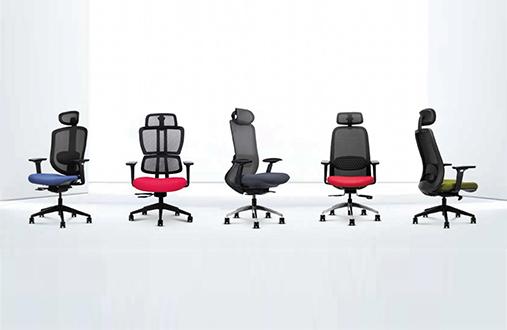
Mesh backrests have gained popularity in warm climates for good reason. They promote airflow, preventing the heat build-up that makes afternoon hours uncomfortable. During humid months, this breathability becomes even more crucial. Quality mesh maintains its supportive structure while allowing air circulation, keeping you comfortable through long work sessions. Designs such as the Wipro Entity reflect this approach and also provide other valuable features like tilt locking and height adjustability.
Seat cushioning requires different considerations. High-density foam provides lasting support without compressing over time, while memory foam options conform to the user's unique shape. The best designs combine multiple densities, with firmer support where needed and softer cushioning for comfort.
The ideal chair configuration depends on multiple factors—user height, work style, desk setup, and specific comfort needs. Start by setting seat height so the feet rest flat with knees at roughly 90 degrees. Adjust the backrest to support the lumbar curve without forcing an exaggerated arch.
Consider these personalisation strategies:
• Position armrests so shoulders remain relaxed and elbows bend at 90 degrees.
• Set seat depth to leave 2-3 fingers' space between seat edge and back of knees
• Adjust lumbar support height to rest at the lower back's inward curve.
• Test different tilt tensions to find natural movement resistance
• Fine-tune throughout the first week as the body adapts
Transforming the workspace into a haven of support involves both immediate actions and longer-term strategies. Small changes often yield surprising results.
Start with posture resets every hour. Stand, stretch gently, and while sitting again, consciously engage the chair's support features. Pull the shoulders back, let the lumbar support guide the lower back, and ensure the feet rest comfortably. These micro-breaks prevent muscles from locking into static positions.
Screen positioning dramatically affects how one sits. The monitor should sit at arm's length with the top at or slightly below eye level. This prevents the forward head position that strains the neck and upper back. Laptop users benefit from external keyboards and stands that allow proper screen height without compromising arm position.
Persistent discomfort despite adjustments signals that the current seating may have reached its limits. If a worker regularly needs pain relief after work and is experiencing numbness or tingling, or finding concentration difficult due to discomfort, the chair likely isn't providing adequate support.
|
Warning Sign |
What It Indicates |
Action Needed |
|---|---|---|
|
Daily back pain after 2-3 hours |
Inadequate lumbar support |
Evaluate chairs with adjustable lumbar systems |
|
Shoulder/neck tension |
Poor armrest positioning or height |
Look for fully adjustable armrests |
|
Leg numbness or swelling |
Incorrect seat height or poor circulation |
Consider seats with waterfall edges |
|
Constant position shifting |
Overall poor fit or worn components |
Time for comprehensive ergonomic assessment |
The journey toward better workplace comfort begins with understanding that quality seating represents an investment in daily wellbeing and long-term health. As work patterns continue evolving, companies recognising this connection attract and retain talent more effectively.
Remember that the most expensive option isn't always the best fit for the team's needs. Focus on finding the right combination of adjustability, support, and quality materials that match the work patterns and physical requirements. Whether furnishing a start-up office or upgrading the home workspace, prioritising ergonomic support pays dividends in comfort and productivity.
Making thoughtful seating choices today shapes how you'll feel tomorrow and years ahead. Explore Wipro's comprehensive seating solutions designed to support your journey toward better workplace wellness.
Ergonomic chairs for back pain provide targeted lumbar support that maintains the spine's natural curve. They distribute weight evenly, reduce pressure points, and encourage micro-movements that prevent muscle fatigue.
Focus on adjustable lumbar support, seat depth adjustment, and quality cushioning. Breathable materials and smooth tilt mechanisms also contribute significantly to all-day comfort and proper posture maintenance.
Review the settings weekly initially, then monthly once comfortable. The needs may change with different tasks, seasons, or physical conditions. Small adjustments can dramatically improve ongoing comfort levels.
Yes, studies show a significant decline in productivity loss with ergonomic seating. Reduced discomfort means better focus, fewer breaks for pain relief, and sustained energy throughout the workday.
Persistent pain after sitting, numbness in legs, difficulty maintaining good posture, or needing frequent position changes all indicate inadequate support. These symptoms often improve dramatically with proper seating for back pain.
Quality ergonomic seating provides value through reduced healthcare costs, improved comfort, and better work performance. Consider cost per use over years rather than upfront price when evaluating investment worthiness.