


Search Here
|
Table of Contents
|
The lower back carries a worker through deadline sprints, afternoon slumps, and those moments when users lean back to gather thoughts. Yet most chairs offer little more than a flat surface against this crucial curve.
The reality is that sitting changes the spine's natural alignment, and without proper support, those eight-hour days accumulate into chronic discomfort. Understanding what lumbar support is helps users recognise why that persistent ache isn't just "part of the job".
Lumbar support refers to any system that maintains the natural inward curve of the lower back while seated. This support fills the gap between the spine and the chair's back, preserving the lordotic curve that the lumbar spine naturally forms when standing. Think of it as a gentle hand supporting the small curve of the back throughout a workday.
The lumbar region consists of five vertebrae that create this distinctive inward arch.
When properly supported, these vertebrae maintain their alignment, reducing strain on surrounding muscles and ligaments. The support works by preventing the pelvis from rotating backward—a common occurrence during prolonged sitting that flattens the spine's natural curve.
The consequences of inadequate support extend far beyond momentary discomfort. When a chair lacks proper backing, the spine compensates in ways that create cascading problems throughout the body.
Sitting fundamentally alters the spine's mechanics. The pelvis naturally tilts backward, flattening the lumbar curve and placing significant stress on spinal discs. This compression can increase disc pressure by up to 40% compared to standing, leading to accelerated wear and potential nerve involvement.
The surrounding muscles work overtime to compensate for this unnatural position. The erector spinae muscles—those vertical bands running along the spine—remain constantly engaged, trying to maintain some semblance of proper posture. This sustained tension leads to the familiar end-of-day exhaustion that makes users want to collapse on the couch.
Standard office furniture often treats back support as an afterthought. These chairs typically feature straight backs that ignore the spine's natural curves, forcing users to choose between slouching or maintaining an exhausting upright position through muscle effort alone.
The one-size-fits-all approach particularly fails professionals who spend 8 to 12 hours seated daily. Without adjustable features, these chairs cannot accommodate the natural variations in spine curvature, torso length, and sitting preferences that exist across different body types.
Modern ergonomic design offers various support technologies, each addressing different aspects of spinal comfort and workplace needs.
Fixed lumbar support systems build a predetermined curve into the chair's structure. While budget-friendly, this approach rarely aligns with individual spine contours. The support might sit too high for shorter users or too low for taller professionals, missing the crucial L3-L4 vertebrae region where support matters most.
These systems work adequately for brief sitting periods but prove inadequate for extended use. The inability to adjust means many users experience pressure points or gaps where support is needed most, leading to the very discomfort the system should prevent.
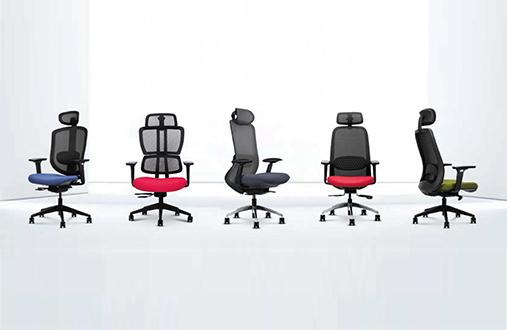
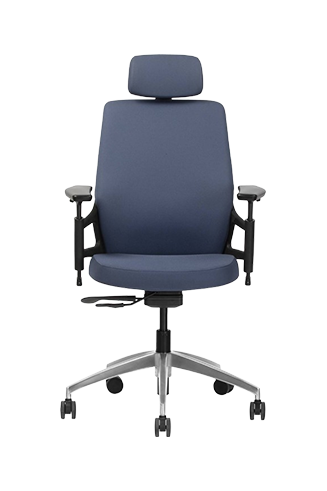
To address these limitations without moving into the premium ergonomic category, some mid-range chairs now combine fixed lumbar structures with adaptive comfort mechanisms. Models such as the Wipro Absolute pair broader lumbar support with automatic weight-responsive recline systems, helping the chair accommodate a wider range of users more naturally than traditional fixed-support designs.
Many ergonomic chairs incorporate adjustable lumbar support systems which can be adjusted for height. This not only ensures that the users get adequate support but also get it at the exact area required, which is the inner curve of the spine. Some models also allow for tension adjustment.
Quality adjustable systems accommodate the general range specified by international ergonomic standards. This range ensures proper support whether users are 5'2" or 6'3", addressing the reality that spine curves vary significantly across individuals.
Advanced support systems now incorporate dynamic elements that respond to a user's movements throughout the day. These mechanisms maintain consistent support whether workers are leaning forward during focused work or reclining during phone calls.
The technology recognises that static positions, even well-supported ones, contribute to fatigue. By allowing controlled movement while maintaining support, these systems encourage the micro-adjustments the body naturally seeks, promoting better circulation and reducing muscle tension.
The benefits of proper backing extend beyond basic comfort, influencing your entire work experience in measurable ways.
Physical discomfort acts as a constant distraction, fragmenting the user's attention between work and the body's protests. When the chair provides appropriate support, this background noise disappears, allowing deeper concentration on the tasks at hand.
Research confirms that ergonomic seating with proper lumbar support directly correlates with improved productivity metrics. Employees report feeling more energised throughout the day, maintaining consistent performance levels rather than experiencing the typical afternoon decline associated with postural fatigue.
Proper support fundamentally changes how muscles engage during sitting. Instead of constantly fighting gravity to maintain posture, the muscles can relax into the chair's support structure. This passive support reduces the metabolic demands on the back muscles, preserving energy for actual work rather than mere position maintenance.
The distributed pressure also improves circulation to muscle tissues. When muscles aren't constantly compressed or overstretched, blood flow remains optimal, delivering oxygen and removing metabolic waste products that contribute to that heavy, tired feeling in the back.
Quality assurance in seating design follows rigorous international protocols that ensure effectiveness across diverse user populations.
ANSI/BIFMA standards represent the gold standard for office seating certification. These specifications mandate specific performance criteria for lumbar support systems, including adjustability ranges, durability testing, and dimensional requirements that accommodate various body types.
Certified chairs undergo extensive testing simulating years of use. The standards specify minimum backrest widths of 36 centimetres in the lumbar region, ensuring adequate coverage for proper support distribution. When selecting seating, these certifications provide assurance that the chair will perform as promised over its lifespan.
Even the most sophisticated support system requires proper adjustment to deliver its benefits. Understanding correct positioning transforms a good chair into your personal comfort zone.
Proper adjustment creates a feeling of gentle, consistent support without pressure points. The backing should fill the natural hollow of the lower back, maintaining contact as users shift positions. Users shouldn't feel like being pushed forward, nor should there be gaps where the back curves away from the support.
Occupational therapists recommend starting with minimal depth and gradually increasing until users find the sweet spot. Many people mistakenly crank the support to maximum depth, creating uncomfortable pressure. The goal is maintaining the spine's natural curve, not forcing an exaggerated arch.
|
Adjustment Sign |
Too Much Support |
Too Little Support |
Just Right |
|---|---|---|---|
|
Lower back feels |
Pushed forward |
Unsupported gap |
Gently cradled |
|
Sitting posture |
Forced upright |
Slouching tendency |
Natural alignment |
|
Comfort level |
Pressure points |
Muscle strain |
Relaxed support |
|
After 30 minutes |
Need to adjust away |
Developing ache |
Sustained comfort |
Remember that proper adjustment might feel unusual initially if users have adapted to poor posture. It generally takes two to three weeks to adjust before making major changes, allowing the muscles to relearn healthy positioning.
While quality seating forms the foundation, comprehensive back health requires a holistic approach to workplace wellness. The chair supports the user, but movement keeps the spine healthy and resilient.
Ergonomics experts recommend the "20-8-2" rule: for every 30 minutes, sit for 20, stand for 8, and move for 2. This rhythm prevents the stagnation that contributes to discomfort while maintaining productivity. Simple desk stretches, walking to the water cooler, or standing during phone calls integrate naturally into this pattern.
Strengthening exercises complement good seating by building the muscle endurance needed for healthy posture. Planks, bird dogs, and gentle back extensions create a strong foundation that works in harmony with the chair's support. The combination of proper backing and strong core muscles provides the best defence against workplace-related back issues.
|
Wellness Insight: The Spine's Daily Journey Think of lumbar support as part of the spine's support team. While the chair provides the foundation during working hours, movement, stretching, and strengthening complete the picture. This integrated approach ensures the back remains strong and comfortable throughout a career. |
Ultimately, lumbar support works best as part of a larger ergonomic ecosystem rather than as a standalone solution. Modern ergonomic chairs increasingly reflect this philosophy by combining structured support with features that encourage natural movement and posture variation. Chairs such as the Wipro Aerosit incorporate adjustable lumbar support, contoured backrests, seat sliders, and weight-responsive recline systems designed to adapt more fluidly to different sitting positions during the workday.
Understanding what lumbar support is empowers users to make informed decisions about daily comfort and long-term spinal health. Quality backing works quietly in the background, maintaining the spine's natural alignment while workers focus on what matters.
The investment in proper seating pays dividends through enhanced comfort, improved focus, and prevention of the chronic issues that plague modern professionals. Explore Wipro's ergonomic office chairs to find support systems designed with wellbeing in mind, bringing thoughtful engineering to every hour of the workday.
1. What is lumbar support in simple terms?
Lumbar support is a chair feature that maintains the lower back's natural inward curve while sitting. It fills the gap between the spine and chair back, preventing slouching and reducing strain on muscles and discs during extended sitting periods.
2. How high should lumbar support be positioned?
Ideal positioning aligns with your L3-L4 vertebrae, typically 15-25 centimetres above the compressed seat height. Users feel gentle support at the lower back's deepest curve. Adjusting the height until the support fills the back's natural hollow without pushing into the user's mid-back region works best.
3. What is lumbar support's main benefit for office workers?
The primary benefit is preventing the 40% increase in spinal disc pressure that occurs with unsupported sitting. This reduction in pressure translates to less fatigue, improved focus, and decreased risk of developing chronic back issues from prolonged desk work.
4. Can lumbar support help existing back pain?
While not a medical treatment, proper support can reduce discomfort by maintaining spinal alignment. Studies show a considerable reduction in back pain symptoms when using quality ergonomic seating. Always consult healthcare providers for persistent pain.
5. How do adjustable and fixed lumbar support differ?
Fixed support offers one predetermined curve that rarely matches individual spine contours perfectly. Adjustable systems allow height and depth customisation, accommodating various body types and sitting preferences for personalised comfort throughout your workday.